
Contents
Podcast metrics tell you:
- Whether your show is reaching people
- Confirm they're the right people
- Understand if you're holding their attention
- Measure the impact you're having on the business
Those are four different questions, and here is the problem:
Most brands answer all of them with one number (downloads) and call it a report.
Stop that. And to help you stop that, I'm giving you the field guide I wish existed when we started measuring branded podcasts.
Below is every podcast metric worth tracking, what each one actually tells you, and exactly where to find it, from the free dashboards inside Apple and Spotify to the audience intelligence you only get from a dedicated analytics platform.
I originally wrote this post in 2022 with six metrics. Most of them still hold up. But measurement has moved fast since then, and the metrics that prove a podcast is working (who's listening, whether they're your buyers, whether any of it touches pipeline) barely existed three years ago. They do now. So, this version got an upgrade.
If your job right now is less "what should I track" and more "how do I prove ROI to my CMO," start with the companion piece: the 11 KPIs branded podcasts should track to prove ROI. This post is the what and the where. That one is the how-to-defend-it.
TL;DR
- Podcast metrics fall into four layers: Reach (how many), engagement (how good), audience intelligence (who), and business impact (so what).
- Downloads are a starting line, not a finish line: The median podcast episode gets just 27 downloads in its first week, while the top 1% pull more than 4,600 (Buzzsprout, 2026). Volume alone tells you almost nothing about quality or fit.
- The metrics that matter most to brands (listener firmographics, demographics, and CRM attribution) are not in the native apps: You need a third-party analytics platform for those.
- Where to find each metric: Foundation metrics (downloads, unique listeners, consumption) live in Apple Podcasts Connect, Spotify for Creators, and your hosting dashboard. Audience intelligence and attribution live in some select hosting platforms and podcast analytics tools (like CoHost!).
Master table: Every key podcast metric at a glance
If you read nothing else, read this. Screenshot it, drop it in your measurement doc, and use it to audit your podcast reporting.
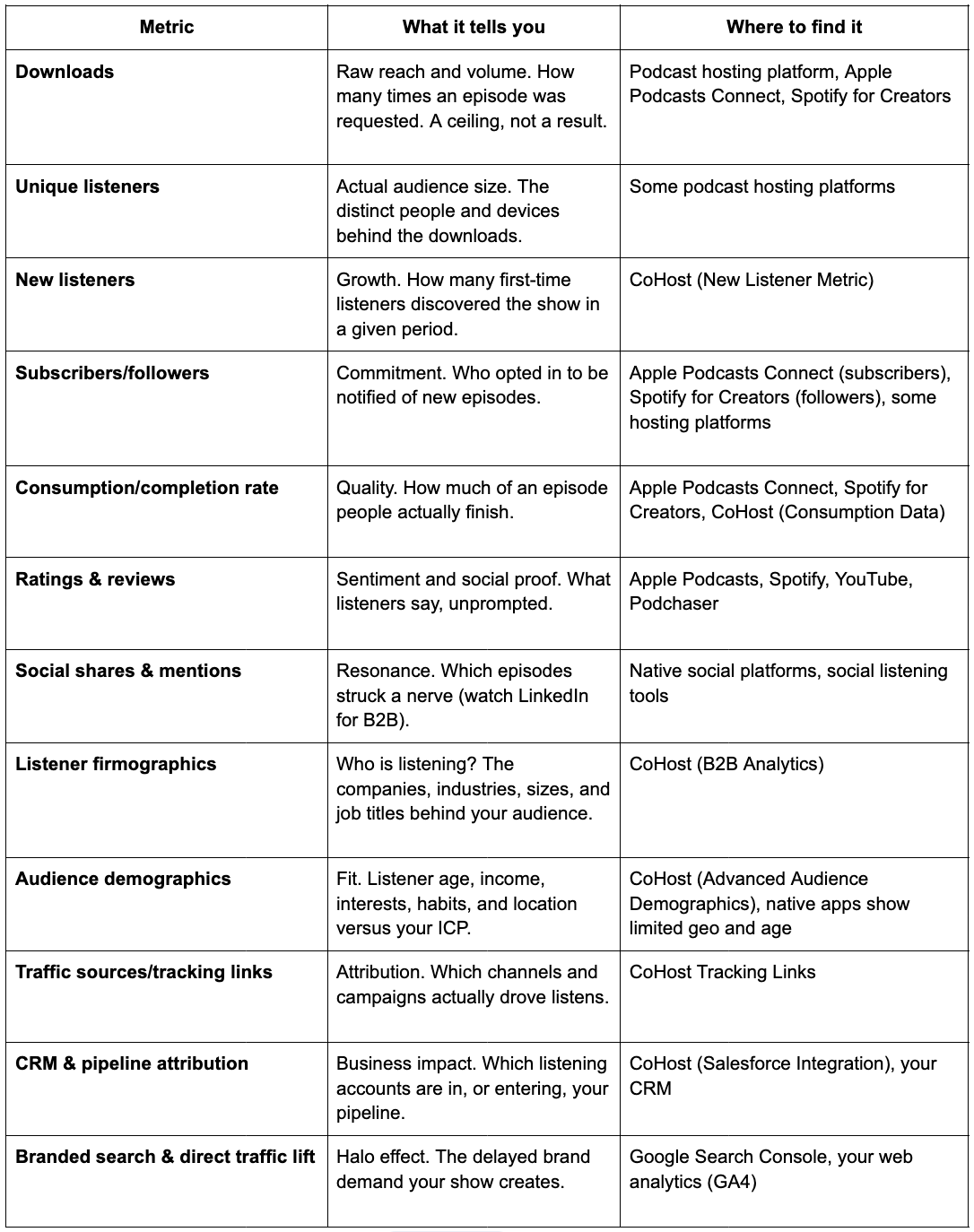
Every podcast metric answers a different question. The mistake most brands make is reporting all of them and answering none.
Reach: How many people are you actually getting to?
Start here, but do not stop here.
Downloads
The metric every report defaults to, and the one most likely to be misread. A download means a podcast app requested your episode file. That's it. It doesn't guarantee a human pressed play, it doesn't tell you if they finished, and it definitely doesn't tell you whether they work at an account you care about.
Downloads are useful for one thing: Tracking whether volume is trending up over time.
And that's still beneficial, but you need to remember the context. Download counts are wildly top-heavy, which is exactly why a raw number in isolation tells you so little. Here's the current benchmark for the first 7 days after an episode is released (Buzzsprout, 2026):
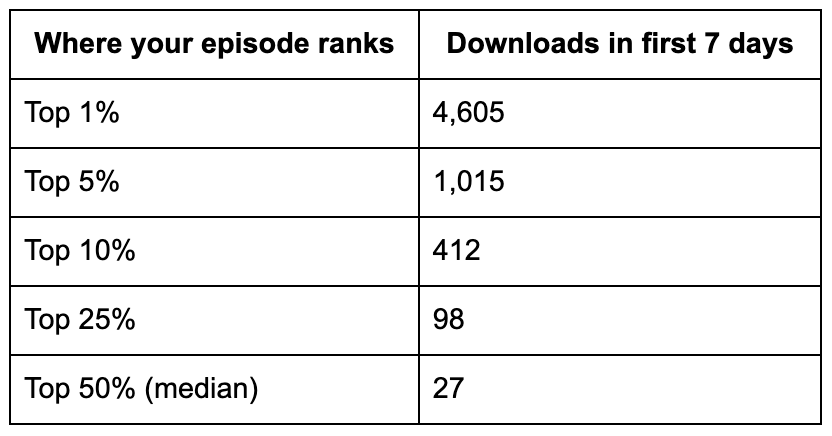
The median episode gets 27 downloads in its first week. Clear a few hundred, and you're already in the top 10% of all podcasts. That spread is exactly why "we got X downloads" means almost nothing until you know who those downloads came from.
Downloads tell you a podcast happened. They don't tell you it worked.
Where to find it: Every podcast hosting platform reports downloads, as do Apple Podcasts Connect and Spotify for Creators. If you want a number you can actually defend, look for an IAB-certified source (more on that below).
Unique listeners
The distinct people, or more precisely, devices, that played at least one episode. This strips out repeat plays and auto-downloads and gives you a cleaner read on true audience size.
Here's the useful trick: Subtract unique listeners from downloads. The gap tells you how much of your download count is repeat listening or episodes that auto-downloaded to a phone and were never actually played. A big gap isn't bad; loyal audiences re-listen, but it stops you from mistaking auto-downloads for reach.
Where to find it: Some hosting platforms report unique listeners, but not all. One thing worth knowing for the enterprise reader is that measurement is only as trustworthy as its methodology.
For example, CoHost is certified under IAB Podcast Measurement Technical Guidelines v2.2 for both Download and Unique Listener metrics, which means the numbers are counted to an audited industry standard rather than a homegrown one. When you're putting a number in front of leadership, that distinction matters.
New listeners
The most underrated metric on this list, and my personal favorite, because it actually tells you if your audience is growing.
New listeners measures first-time listeners, the people who discovered your show in a given window and were never in your audience before. Unique listeners blends new and returning together. New listeners isolates the growth.
Without that split, you genuinely cannot tell whether last month's bump was fresh reach or your existing fans listening more. Lean on this metric to understand whether podcast growth campaigns are driving new audiences or not.
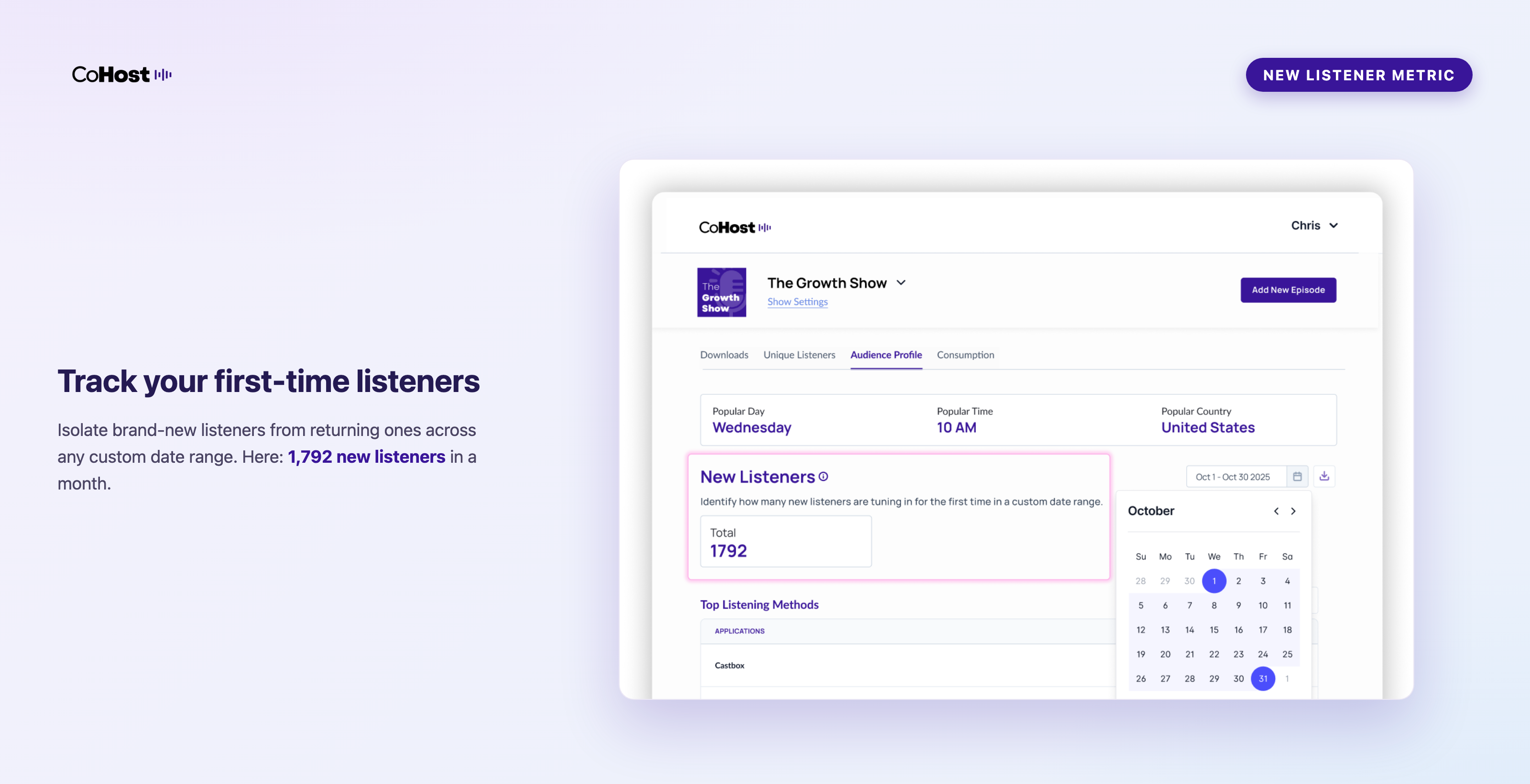
Track this with CoHost. CoHost's New Listener Metric separates first-time listeners from returning ones across weekly, monthly, quarterly, and annual views, so you can tie acquisition spikes back to a campaign, a guest, a paid push, or a specific episode topic.
Subscribers and followers
Subscribers (Apple) and followers (Spotify) are people who opted in to be notified of new episodes. Different from a listener (you can follow without downloading the latest episode) and different from a download (you can download without following). I know. It's confusing.
Remember, plenty of loyal listeners never subscribe. I don't follow half the shows I listen to weekly, because Spotify's algorithm already surfaces them for me. So track it, but don't build your narrative on it.
Where to find it: Apple Podcasts Connect (subscribers) and Spotify for Creators (followers). These live in the native dashboards; some podcast hosting platforms will add the metric to dashboards, but not many.
Engagement: Is the show any good?
Reach tells you the show exists. Engagement tells you whether it's working.
Consumption and completion rate
The percentage of an episode the average listener actually completes. This is the single best indicator of whether your content is resonating.
Consistently 70% or higher, and your format is landing. Under 40%, something's off. Maybe it's pacing, length, the opening, the guest, the topic, or maybe you're reaching the wrong audience with the wrong content.
You can get so much valuable information from consumption rates and drop-off curves. If listeners bail at roughly the same point, episode after episode, that timestamp is your problem and something you need to fix.
Where to find it: Apple Podcasts Connect and Spotify for Creators both show consumption or retention curves for their own platforms. CoHost's Consumption Data pulls Apple and Spotify listening behavior into one view, so you're not stitching two dashboards together.
Ratings and reviews
The closest thing to spontaneous word-of-mouth you can measure. Volume matters less than pattern, so what listeners praise, what they gripe about, and which episodes they name.
Reviews also feed discovery. Apple weighs review velocity as one input into its category charts and New & Noteworthy placement, so strong recent reviews compound into downloads you didn't pay for. Think of Apple and Spotify reviews as the podcast version of a G2 or Capterra page.
Where to find it: Apple Podcasts, Spotify, YouTube, and aggregators like Podchaser.
Social shares and mentions
When an episode gets shared unprompted on LinkedIn, Slack, or Reddit, that's your clearest signal of what content struck a nerve. For B2B branded podcasts, watch LinkedIn especially closely, because that's where your buyer already is.
Where to find it: Native social analytics plus a social listening tool if you have one. There's no single podcast dashboard for this, which is exactly why so few teams track it.
Audience intelligence: Are these the right people?
My absolute favorite layer as a marketer, and the one where most branded podcasts stop measuring. But this is right when it gets interesting, I promise.
Let me frame it this way: Reaching 10,000 people means nothing if none of them are buyers, partners, or people your leadership cares about. Personally, I'd rather a channel reach 100 of my exact buyers than 10,000 ears or eyeballs that don't fit my ICP.
Listener firmographics (B2B Analytics)
If your podcast targets businesses, and nearly every branded B2B podcast does, the question isn't how big your audience is. It's which companies are in it.
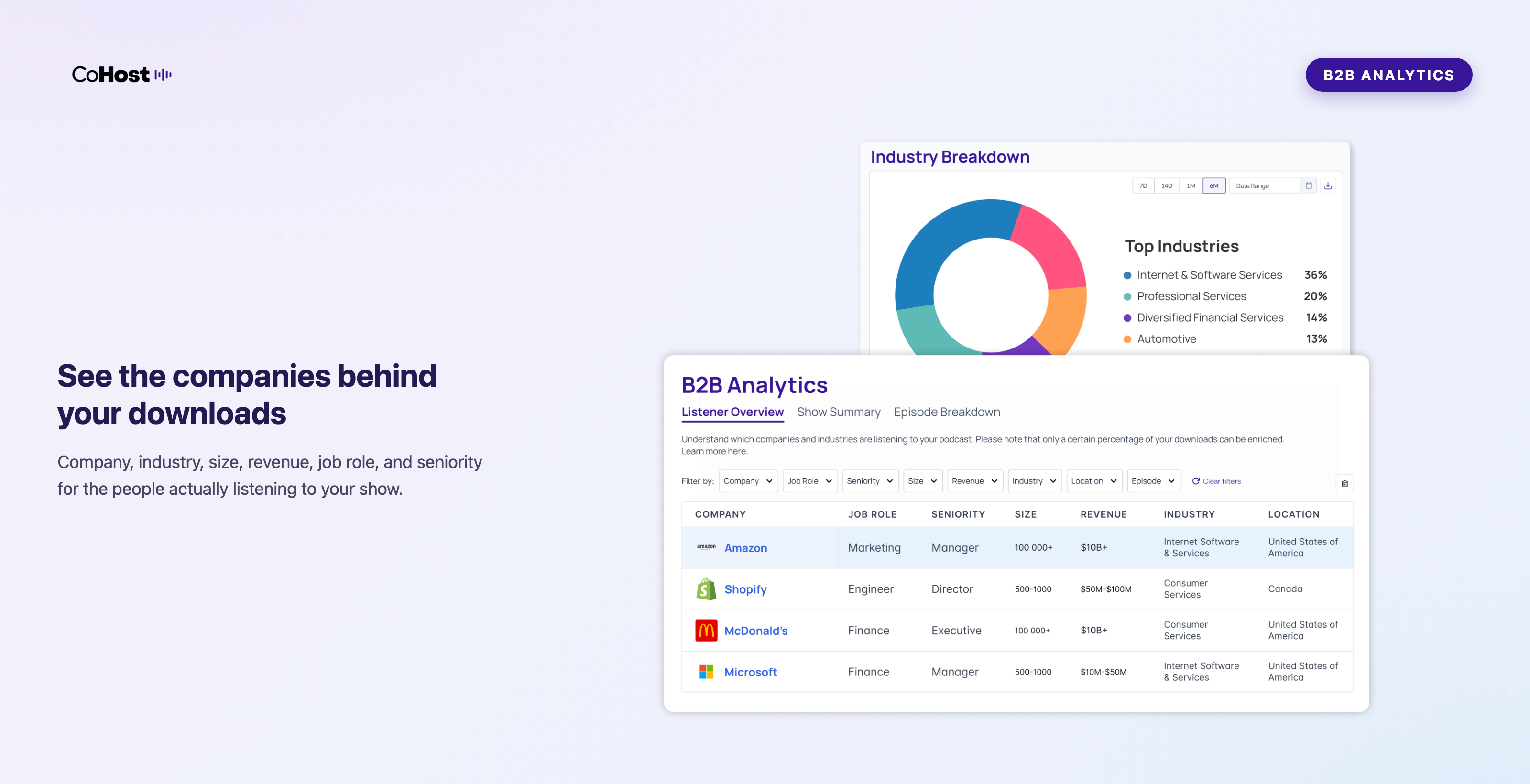
Firmographics answers that. You can see the company names, industries, employee counts, revenue bands, job roles, and seniority levels of the people listening, and which episodes they tuned into. Knowing that 14 of your target accounts listened this month is a fundamentally different conversation than knowing you got 4,200 downloads.
Identifying the companies listening to a show is honestly the advancement that got me most excited about podcast measurement in the last few years, because it's the thing that finally connects a top-of-funnel channel to accounts you're actively trying to win.
CoHost's B2B Analytics was built for exactly this: to allow you to identify the companies listening to your podcast. You get:
- Company insights: Company name, industry, size, revenue, and location
- Employee insights: Job role and seniority
- Episode insights: The episode each employee listened to
Plus, the ability to filter by account or episode and export segmented lists for your ABM and sales teams. For revenue teams, it's the closest thing to seeing your listener list in a CRM view.
Audience demographics
Demographics used to mean geography and not much else. Location still matters (it tells you where to sell and where you have surprising pockets of audience), but you can now go well beyond it, like:
- Listener age
- Income
- Interests
- Lifestyle
- Habits
Together, they tell you whether you're actually reaching your ICP or just a lookalike of it.
Track this with CoHost. CoHost's Advanced Audience Demographics surfaces listener income, age, interests, habits, and geography with actual data. The native apps give you a thin slice of this (rough age and location), but the full picture needs a dedicated platform.
Business impact: So what?
The metrics that get a podcast renewed for season two, three, and beyond.
Traffic sources and tracking links
Podcast tracking links (sometimes called smart links) tag your promotional channels so you can see whether that LinkedIn post, newsletter placement, or paid campaign actually drove downloads.
Where to find it: CoHost Tracking Links attribute growth back to the channel that caused it. This is the podcast equivalent of UTM tracking, and most teams skip it, then wonder why they can't explain a spike in listenership.
CRM and pipeline attribution
Being able to connect listener data to actual pipeline activity is the holy grail for B2B branded podcasts. And if you think that can't be done, it's time to think again.
Quick backstory, because it explains why I care about this one so much. At Quill, we were trying to tie podcasting to pipeline for our clients, and the data simply wasn't available.
So we built CoHost, the podcast analytics and growth platform I now lead marketing for alongside Quill, to give our own clients and the wider market the audience insights needed to measure podcast ROI.
B2B Analytics collects the firmographic data mentioned above. But then we took it one step further and built a direct integration into Salesforce (with more CRMs on the way) that feeds listener company, role, seniority, episodes listened to, and consumption straight onto the account record.
For sales and revenue teams, this now unlocks the ability to see that an account they've been chasing has been listening to your show. Or your marketing ops team sees that a meaningful share of last quarter's closed-won deals listened to the podcast before they converted. Or even identify new ABM opportunities based on the engaged brands tuning in. That's an incredible business impact you can point to.
The CoHost Salesforce Integration pushes listener company data into Salesforce automatically, so podcast engagement shows up as a signal on the account, the same way your team already treats channels like webinar attendance or gated-content downloads.
Branded search and direct traffic lift
Okay, this is a more challenging metric to measure with podcasting. But stay with me.
Let's say someone hears your brand in context, doesn't click anything, and searches for you directly three weeks later. That delayed behavior shows up in two places you already own:
- Branded search volume (Google Search Console)
- Direct website traffic (your web analytics)
So, with context to podcasting, run a 90-day lookback each quarter. Compare branded search and direct traffic before a podcast launch or campaign push against the period after. If a specific episode over-performed on downloads and unique listeners, line it up against any brand-search lift in the same window.
I know, it's not perfect attribution (what is these days?), but it's a measurable piece of proof to point towards.
Where to find it: Google Search Console (branded search) and GA4 or your web analytics (direct traffic).
A note on vanity metrics
Quick opinion before the FAQ, because it's the whole point of this post.
Don't get bullied into reporting downloads as if that's the story. Downloads are easy to understand, which is exactly why they're the metric most likely to be misread. A 100,000-download show reaching the wrong audience is worth less than a 5,000-download show reaching 40% of your target account list.
The discipline isn't to stop reporting downloads. It's not to let downloads stand alone. Pair every volume metric with a quality metric and an audience metric, and your reporting stops sounding like a download dump and starts sounding like data-driven marketing.
Podcast metrics FAQ
What are the most important podcast metrics to track?
It depends on your goal, but a complete picture covers the four layers I discussed above: Reach (downloads, unique listeners, new listeners), engagement (consumption rate, reviews, shares), audience intelligence (listener firmographics and demographics), and business impact (CRM attribution, branded search lift). Most teams have the first two covered and are blind to the last two, which is where the ROI story actually lives.
How many podcast downloads is good?
There's no universal number, and anyone who gives you one is guessing. Context is everything. I've seen branded shows pull 5,000+ downloads an episode, and I've seen ones pull 200, where those 200 were senior decision-makers in a niche industry the brand sells into. For that show, 200 of the right listeners beat 20,000 of the wrong ones. Judge downloads against your audience quality, not a leaderboard.
What's the difference between downloads and unique listeners?
A download is a request for your episode file, and one person can generate several. Unique listeners counts the distinct people or devices behind those downloads. If you listened to an episode five times, that's five downloads and one unique listener. Downloads measure volume; unique listeners measure actual audience size.
What's the difference between unique listeners and new listeners?
Unique listeners is everyone distinct who played an episode in a period, new and returning combined. New listeners isolates only the first-time listeners who weren't in your audience before. Unique listeners tells you reach; new listeners tells you growth.
What's a good podcast consumption or completion rate?
For branded podcasts, 70% or higher is strong and means your format is landing. Under 40% is a signal to retool. More useful than the average, though, is the drop-off curve: if listeners consistently leave at the same timestamp, that's the specific thing to fix.
Where can I see which companies are listening to my podcast?
Not in the native apps. Company-level data (listener firmographics) requires a B2B podcast analytics platform. CoHost's B2B Analytics surfaces the companies, industries, sizes, and job roles listening to your show, and can push that data into Salesforce so your sales team sees it on the account record.
What's the best tool to measure podcast performance?
I recommend using your podcast hosting platform to measure performance. Depending on your needs, aim to get one that covers the majority of metrics you're looking to track to make it easy. I'm not trying to be salesy but rather suggest a tool that's genuinely useful for brands. CoHost was specifically built to help brands measure audience quality and prove ROI.
Can you actually measure podcast ROI?
Yes, when measurement is set up correctly, you can identify which companies are listening, push that data to your CRM, and let sales open conversations with podcast engagement as context. For the full framework, including which KPIs to report and how to map them to a business objective, see our guide on the 11 KPIs branded podcasts should track to prove ROI.
Where to start with measuring key podcast metrics
If you're already running a branded podcast, audit your current reporting against the table above. Most teams we work with at Quill have reach and engagement handled, but can't answer the two questions that actually justify the budget:
- Who's listening?
- Did any of it matter?
That's the gap to close.
If you're launching, decide what you're measuring before you publish episode one. Pick the metrics that map to your goal, and set up the infrastructure (hosting, analytics, tracking links, CRM connection) up front. Retrofitting attribution six months in is far harder than starting clean.
Either way, get out of the downloads-only trap. The metrics that prove a podcast works exist now. Use them.
Want more on measuring and growing branded podcasts? Sign up for our bi-weekly newsletter, The Branded Podcaster. And if you want to see the audience intelligence side for your own show, chat with the CoHost team.
Share
About the author

A passionate storyteller, Ali is Quill’s Director of Growth Marketing, previously the co-founder and CMO of the branded podcast agency, Origins Media Haus (acquired by Quill). She excels in merging creativity with data in order to successfully build and grow a brand.




.png)


.png)
.png)
.png)
.png)